
SilverStone WS380-E Workstation Case Review
Author: Dennis Garcia
Introduction
It has been a really long time since I reviewed some hardware that wasn’t specifically designed for gamers. Of course, grouping computer hardware enthusiasts into the gaming genre isn’t something I normally do but, the majority of hardware I have been reviewing was for the vocal minority who enjoy flashing lights, fast cars, loose significant others and a reasonable expectation that their computer build is the best. If you haven’t noticed the PC market has been changing quite a bit. Gone are the days of massive multi-GPU gaming builds and hardware overclocking all to be replaced with massive multi-GPU AI builds and hardware overcompensation.
In this review we will be looking at a slightly different case from SilverStone designed for the computer hardware professional. The WS380-E Workstation case is a chassis I first saw at Computex 2024 and was immediately hooked at the logically compact design and ability to handle retail computer hardware.
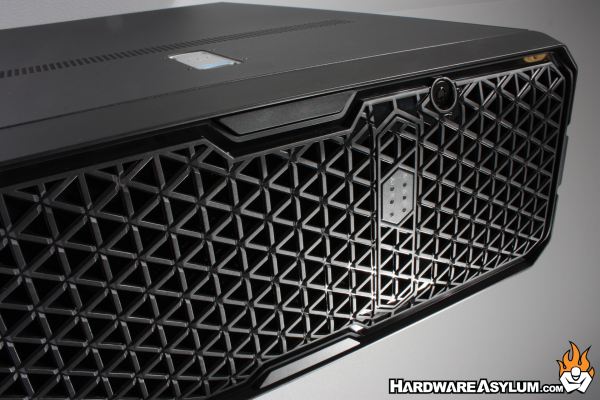
The enterprise market has been exploding for the past couple years as everyone tries to get a piece of the AI hype and while the majority of AI specific hardware is designed for the datacenter there is a growing number professionals looking to replicate this on a smaller scale. This often means building up systems differently using workstation grade hardware and more traditional graphic cards. Building systems this way allows companies to better control budgets and casually upgrade when the situation arises.
This computer case is not intended for the gamer but, for the professional looking to build a Workstation class machine and have the maximum amount of expandability across the entire hardware spectrum from expansion slots and GPUs to memory and storage. This case even has an option for hot swap PSUs and can be used as a workstation tower or racked up in a datacenter. Personally, I find the appeal to be, for the home lab user but could be a perfect edition for just about any content creator.
- Supports 8 x 2.5"/3.5" SAS/SATA SSD/HDD hot-swappable drive trays.
- Backplane supports 8-port SAS/SATA drives and 12 Gb/s Mini-SAS HD SFF-8643 + SGPIO.
- Supports up to E-ATX and SSI-EEB motherboard.
- Supports ATX (PS2) and 2U redundant PSU.
- Supports 360mm radiators.
- Supports 2 x 5.25" and 1 x 3.5" drive bays.
- Supports interface cards up to 370mm
- Multi-GPU support with 8 PCI expansion slots.
- Front door panel with lock design for additional security.
- Front I/O ports: 1 x USB Type-C, 2 x USB 3.0
Model No: SST-WS380-E
Material: Plastic front panel, Galvanized steel body
Main metal thickness: 1.0~1.2mm
Motherboard: SSI-EEB, SSI-CEB, Extended ATX, ATX, Micro-ATX, Mini-ITX
HDD backplane: 8 ports SAS / SATA to Mini-SAS HD SFF-8643 x 2 with SGPIO
HDD power connector: 4-Pin peripheral x 2
HDD interface: SAS-1 / SAS-2 / SAS-3 / SATA-1 / SATA-2 / SATA-3
Drive bay: 2.5” / 3.5” SAS / SATA external hot-swapping x 8 / 5.25" x 2 / 3.5" x 1
Cooling system
- Rear: 80mm x 2 (8038 x 2 black fans included)
- Internal: 120mm x 3 (12025 x 3 black fans included)
Radiator support: 120mm / 240mm / 360mm
Expansion slot: 8
Limitation of expansion card
- Length: 370mm
- Width: 150mm
- GPU Cooler 134mm / 145mm without holder
Power supply: PS2 (ATX) / 2U Redundant
Front buttons: Power On / Off, system reset
Front I/O port: USB Type-C x 1 / USB 3.0 x 2 / SPK x 1 / MIC x1
LED Indicators
- Chassis: Power LED x 1: Green / HDD Access x 1: White / LAN LED x 2: Green / UID x 1:White / Sys Error : Red
- HDD Tray: HDD Power LED : Green / HDD Access : Blue blinking
Dimension: 453mm (H) x 175mm (W) x 683mm (D) / 17.83" (H) × 6.89" (W) × 26.89" (D)
Net weight: 16.62 kg
Note: * The internal USB 3 Type-C cable is 800mm in length. If you plan to connect external storage devices, please avoid using excessively long external cables to prevent potential speed reduction.
