
MSI MEG X870E ACE Max Motherboard Review
Author: Dennis Garcia
Conclusion
In this review we took an in-depth look at the MSI MEG X870E ACE Max motherboard. This board is built on the AMD X870E chipset supporting Ryzen 9000 / 8000 / 7000 AM5 processors and DDR5 memory. The Ryzen family has been rather popular with gamers both for its overall affordability and gaming performance. Pair that with a current generation video card and you'll have a top notch gaming rig that will last for quite a while. The MSI MEG X870E ACE Max is a rather unique motherboard that it occupies the top of the range of motherboards from MSI. Of course, there are unicorns but, when it comes to available products the ACE line will be your best bet.
The layout is rather typical for the modern gaming motherboard with a total of three expansion slots, all using bandwidth from the CPU. If you use a single GPU the topmost expansion slot will provide a full 16x lanes of PCI Express at Gen5 speeds. If you decide to populate the second 16x slot, the number of lanes will be reduced to 8x/8x but will allow you to use dual GPUs or expand your storage portfolio.
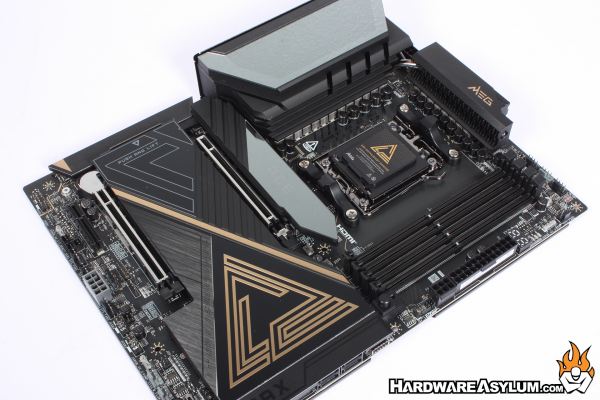
Speaking of storage, the ACE Max comes with a total of five M.2 slots. The primary drive location is near the CPU featuring the largest heatsink and operated by the EZ latch system that requires no tools and has a ARGB enabled logo across the top. Three more M.2 slots are located below and protected by a larger EZ latch enabled heatsink. The final M.2 is located on the reverse side of the motherboard and might be the best or worse drive location depending on your outlook.
The rest of the motherboard is feature packed with dual 10G and 5G ethernet ports, onboard WiFi7 and a whole host of performance features from the Frozr based VRM cooler to onboard bench controls and debug LED. For those looking to do some LN2 overclocking I even spotted some voltage test points and supplemental power connections.
Overall, I really found the X870E ACE Max to be quite enjoyable to use and one of the easier boards to setup, tweak and tune. It comes with support for the latest connection standards, some I actively use and others, I wonder why exist. Point is, they are available and help to distinguish this board from others on the market. I will admit that I took the path less traveled when I did the overclocking tests. This is partially because I knew the limits of my CPU but also because the PBO setting in the MSI UEFI just works. Simply enable it from the Easy menu, then set your XMP profile and away you go.
Next Generation Design
Solid Performance
Build in Overclocking
Supports 5x M.2 Drives
PCI Express 5.0
Black Gold Color Scheme
Great Gaming Platform
Excellent Onboard RGB Light Display
UEFI is dark
Questionable default performance

Recommend
https://www.hardwareasylum.com
