
Building a Multi-GPU AI Workstation on a Budget
Author: Dennis Garcia
Introduction
In my previous article discussing the balance between model quality and hardware demains on AI Workstations, I talked about the relationship between the AI model and overall memory consumption. While many people think that a high-performance GPU is all you need to run AI related tasks the fact of the matter is, that is only part of the story and total memory is actually more important. Without sufficient memory you limit what models you can run and what tasks you can complete the role of the GPU is to accelerate everything. This is one of the reasons for the memory shortage in 2026 as the demand for AI datacenter hardware has consumed the entire wafer supply limiting what DRAM and NAND is available for consumers.
Currently there are three AI servers in the Hardware Asylum and Ninjalane Labs. The first is on the hosted machine that serves up the website and associated services (where you are currently reading this article). Second is a single GPU setup for the Ninjalane Labs local AI voice assistant, this system uses a small model attached to the Home Assist smart home software and works to extend what Home Assist can provide to my smart home devices.

The third and final machine is my dedicated AI Workstation that I use for development, automation, training and content creation tasks. This machine will be the focus of this article and the system specs are below.
ASUS ROG Strix TRX40-E Gaming – TRX40 Chipset
AMD Ryzen Threadripper 3960X (3.8Ghz) 24 Core 24 x 512KB L2 Cache 8x 16MB L3 Cache
Noctua NH-U9 TR4-SP3
2x nVidia RTX A4500
4x Crucial Pro PC4-3200 32GB
Acer FA200 4TB SSD
Acer FA200 2TB SSD
SilverStone Strider Platinum 1200 Watt PSU
SilverStone WS380-E Workstation Case
Debian Linux
If you are well versed in computer hardware you will quickly realize that this workstation is “not new” and, really that is the point. With a setup like this you can do a considerable amount of AI work including content generation, fine tune training, inference and image generation.
This system effectively allows me to run models up to 30B (with INT4 quantization) and get decent performance at around 30Tok/s in Ollama. Smaller models are considerably faster and I have discovered that MoE (Mixture of Experts) models tend to become speed demons at lower Quants due to how they are layered internally.
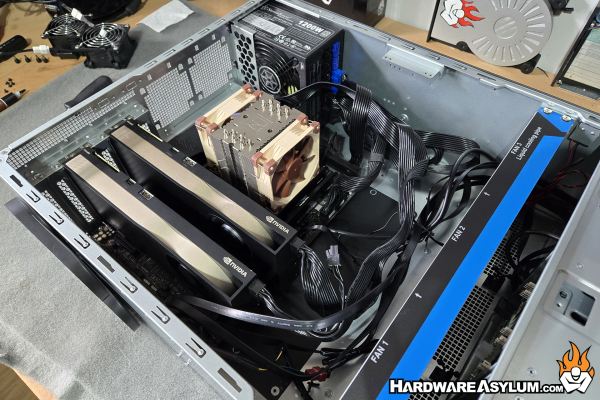
My preferred AI Model is Gemma3-12B Instruct which I run at INT8 (or Q8_0) and allows me to have an extremely accurate model with a context length of 32K. With my RTX A4500 cards I can load this model on a single GPU leaving the second card open for model comparisons or running ComfyUI and other generation tools.
If you followed my previous article, you’ll quickly realize that I could run near the full 128K context length if I ran Gemma3-12B at INT4 but, for this model, I wanted to have a rather accurate interaction and didn’t feel that extra context length would help for my particular situation. What many people do not realize is that model interactions progressively slow down as the KV Cache starts to fill. At greater than 32K the response time gets long enough that I find it better to move my discussions to a new chat.
In theory, with my current hardware I could run the Qwen3 235B model. To do this I would need the Ollama Q4_K_M (INT4) model and would need to accept running it split between CPU memory and GPU memory. Overall KV Cache would be extremely small and inference would process from the 3960X Threadripper. Despite the 48 threads I would fully expect a sub 1Tok/s inference speed along with a model I couldn’t really use.
