
Aorus X870E Elite X3D Ice Motherboard Review
Author: Dennis Garcia
Conclusion
In this review we took a look at the Aorus X870E Elite X3D motherboard built on the AMD X870E chipset supporting Ryzen 9000 / 8000 / 7000 AM5 processors and DDR5 memory. This board is part of the Gigabyte X3D motherboard refresh that was shown during CES 2026. It is not uncommon for motherboard makers to issue refresh boards either to address issues from the previous production run or to introduce new features and support. For the most part this refresh was intended to unify the Aorus product line from a feature perspective.
Some of the highlighted changes include the following items
- X3D Turbo Mode 2.0. This is a type of one click overclocking
- Memory frequency support was raised to 9000MT/s
- VRM heatsinks are now a core touch design for better thermals
- All of the X3D motherboards now have a backplate
- 8 Layer PCB with memory back drilling to lower memory interference
- EZ-DIY Friendly features including PCI Express latch buttons, M.2 EX Flex and Match for drive installation
- Benchtop buttons on the I/O Shield
- Driver BIOS to assist getting systems running faster
Most of these features the end user will not ever notice but, for hardware enthusiasts, we like to see that there is always forward momentum in product development. Sometimes these changes will increase performance or improve overall quality.
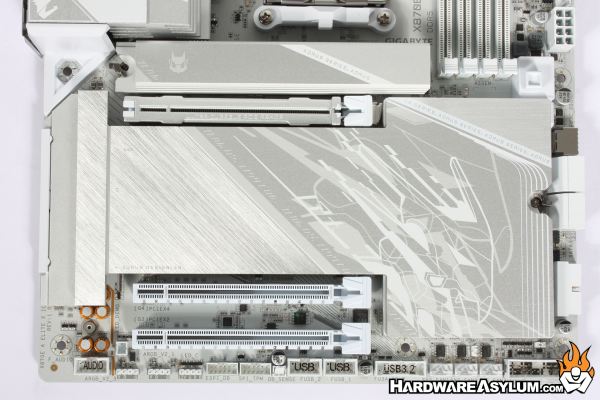
As I mentioned early in my review the Elite is one of the mainstream motherboards located at the bottom of the Aorus series lineup. Due to the positioning and price ceiling, there will be excluded features. For instance, there is only one Gen5 PCI Express expansion slot for graphics and while there is a total of three expansion slots, they do not operate at full bandwidth or, even at Gen5 speeds.
When it comes to storage two of the M.2 slots are Gen5 compliant and feature enhancements to improve thermal performance while still making them easy to install. I am a little surprised to see that the board only supports 80mm and 110mm M.2 drives but, those are the most common on the market. One of the nice X3D upgrades is that EZ latches are included for every M.2 heatsink making it rather easy to finish a build quickly.
As you can expect, the rest of the motherboard is packed with the normal assortment of features, single ethernet port but WiFi 7 onboard and ready to use. The Ice color scheme is extremely nice and while my photos do not do the board any justice, the ones you will find on the Aorus website are quite accurate. Heatsinks are a light silver color with white accents while the PCB is a flat white with black accents from the various surface mount components.
When it comes to performance and usability, the board was flawless out of the box posting scores that rival the reference systems. However, when it comes to overclocking and performance tuning, the board fought me all the way, first with a strange BIOS misconfiguration that would cause my benchmarks to fail. XMP/EXPO memory profiles would cause the board to freeze during post and PBO changes were a solid 50/50 on stability and often would not provide any performance improvement.
In my previous Aorus Elite review I used the AMD software to overclock the system, and while there was some success the level of effort was not worth the trouble. I did try out the X3D Turbo feature and while that did effectively increase core frequency the overall performance dropped due to half of the CPU being shut off. This is a simple metric of heat vs power, the Ryzen 9 9950X is heat limited so, the only way to increase frequency is to lower the thermal demand. Sadly, due to in-effective overclocking support and stability, the overclocking section of this review could not be completed.
Overall, the Aorus X870E Elite X3D Ice is a really solid board and if you are looking to white out your next AM5 build, it will look amazing and likely do everything you need and thus fulfilling the mid-range mainstream market demand. However, if you are looking to tweak and tune your build or even want a good amount of onboard ARGB you will likely be left disappointed.
Ice Design Looks Amazing
Solid Out of Box Performance
Supports 4x M.2 Drives
PCI Express 5.0
Excellent Industrial Design
Great Gaming Platform
Graphics All Around
Very little onboard RGB lighting
No real onboard audio
Poor overclocking support or stability
